built from 99058fe ·

source

Aizome 藍染

A desktop of its own, from the compositor to the calculator.

Aizome is indigo dyeing: cloth dipped again and again, each dip adding depth. It is also Sekka's desktop, the one Sekka is made for: a Wayland desktop written in Rust on its own toolkit, Sukumo 蒅, taking its ideas from Haiku, NeXTSTEP and IRIX.

Visit aizome.computer →Download Sekka

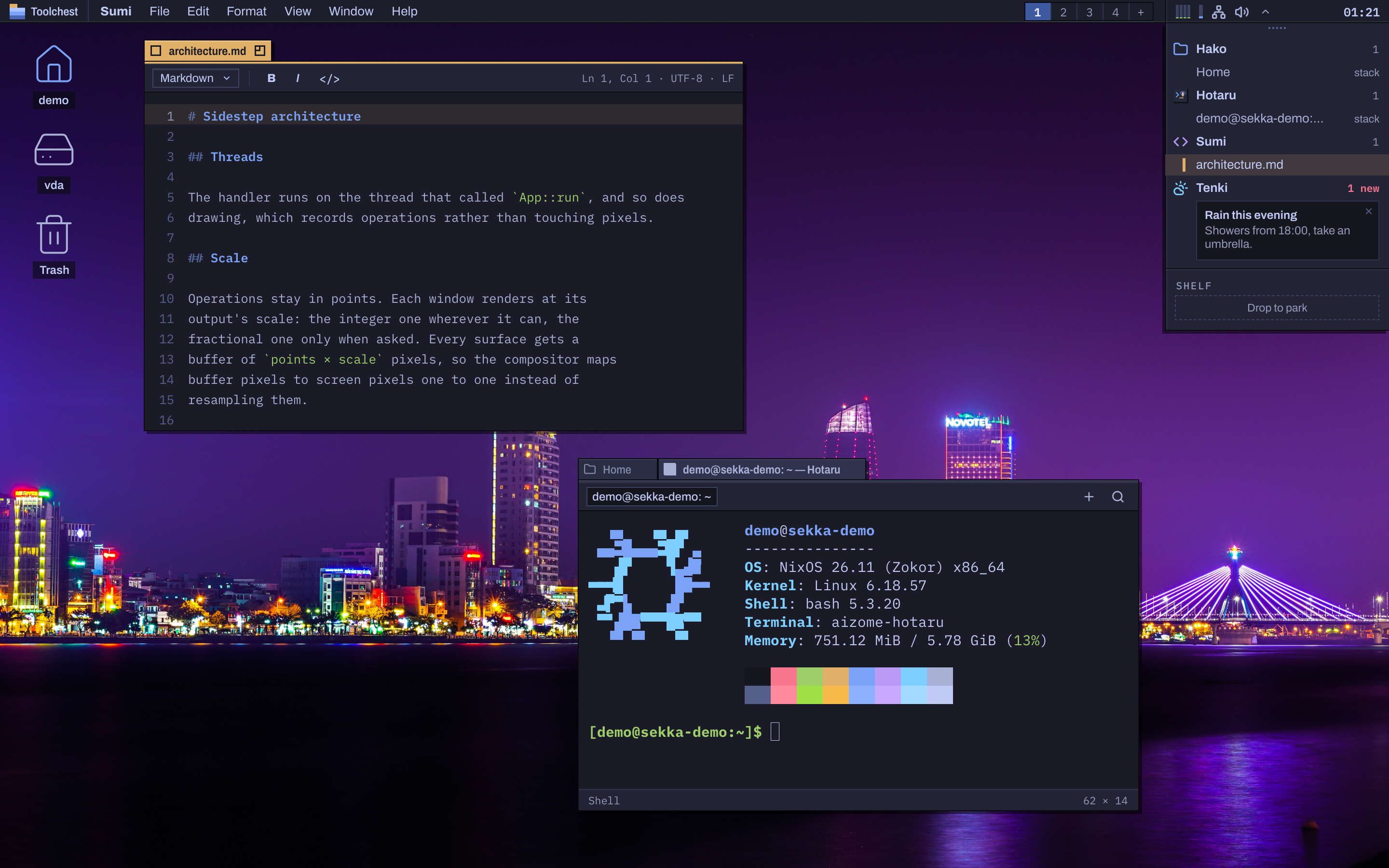
The Aizome desktop: Sumi editing a Markdown file, Files and Hotaru, Aizome's terminal, running fastfetch, stacked in one tab group beside it, the menu bar along the top, and a notification filed under Tenki in the Deskbar.
Sumi, with Files and Hotaru, Aizome's terminal, stacked in one tab group beside it, in a test VM built from Sekka's own modules. 2880 × 1800, not upscaled

Tabs and groups

Every window wears a tab only as wide as its title, as Haiku's do. A new window of the app you're using opens as another tab on its window. Drop one tab among another window's and the windows stack into a group, from any apps, the tab going where you dropped it. Drag a group's tab to reorder it (Alt-drag for the one showing), and slide a tab along the top edge with Shift.
One menu bar

The menu bar shows the menus of the app you're using, as NeXT's did. Any menu tears off into a palette that stays while its app is focused, or always, once pinned, and palettes are remembered between sessions. Services act on selected text: make a note of it, open it in Sumi, search the web for it, or calculate it.

Toolchest, Deskbar and Desks

The Toolchest, from IRIX, opens applications by category, places, Desks and the session. The Deskbar, from Haiku, lists each app with its windows and files its notifications beneath it; drag its strip to stand it at the left or right, and its edge to make it wider, slimmer or icons only. Desks keep work apart, and Super + Ctrl + ↑ shows them all.

Made for the keyboard

Aizome takes as much from modern tiling window managers as from Haiku. Fill the screen with a window or split it left or right from the keyboard, move between numbered Desks and carry windows with you, switch apps and their windows, and open any window's menu with a key for every move. Every command in every app is in the palette, which teaches you its shortcut as you go.

Every keyboard, set up for you

Super is the command key in every app: Super + C copies, in the terminal too. Each keyboard keeps its own modifier keys, Caps Lock and Compose key. Plug one in or pair it, press the key beside its space bar, and Settei suggests where Super should go, so it sits under your thumb on a Mac keyboard and a PC keyboard alike.

One file chooser

Browsers, Electron apps, Zed and Flatpaks open and save files in Aizome's own chooser: Files' sidebar and path bar over the app's window, with its filters and options.

Fast by construction

Integer scaling, opaque surfaces, damage-only redraws, and a budget of 4 ms for every frame of the desktop and its apps. Aizome composites on the graphics card, and in software when it has to: the boot menu's recovery entry draws the same session without a GPU driver.

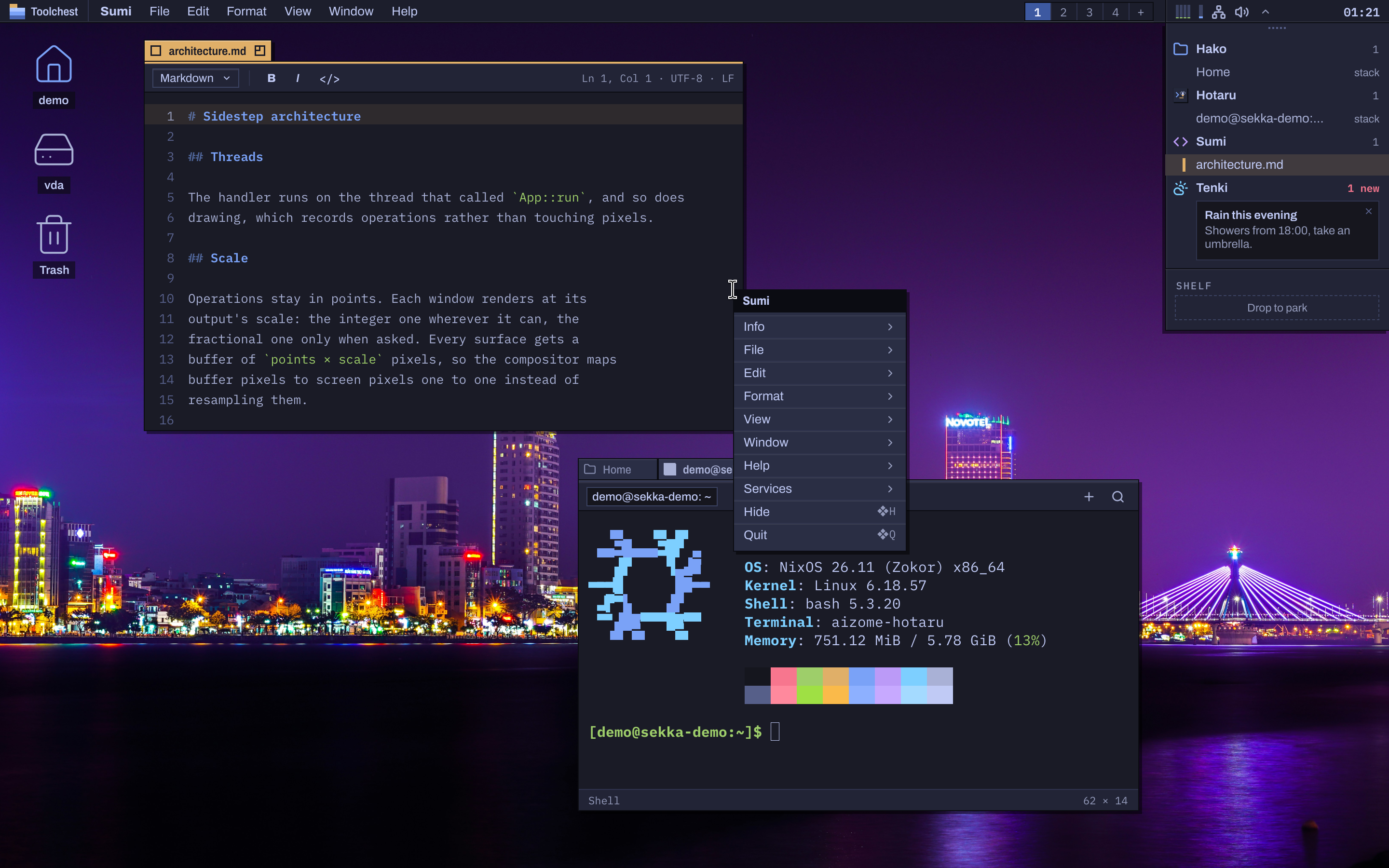
Super + right-click anywhere, or right-click the empty desktop, and the focused app's whole menu opens at the pointer: the app's name in its title strip, every menu as a submenu, Hide and Quit at the bottom. Drag the title strip and it tears off into a palette.

Menus answer the keyboard too: F10 focuses the menu bar, the arrows move, Return chooses.

Aizome with Sumi's whole menu open at the pointer, every menu of the app as a submenu.
Sumi's whole menu, opened with Super + right-click, in the same test VM. 2880 × 1800, not upscaled

A palette for everything

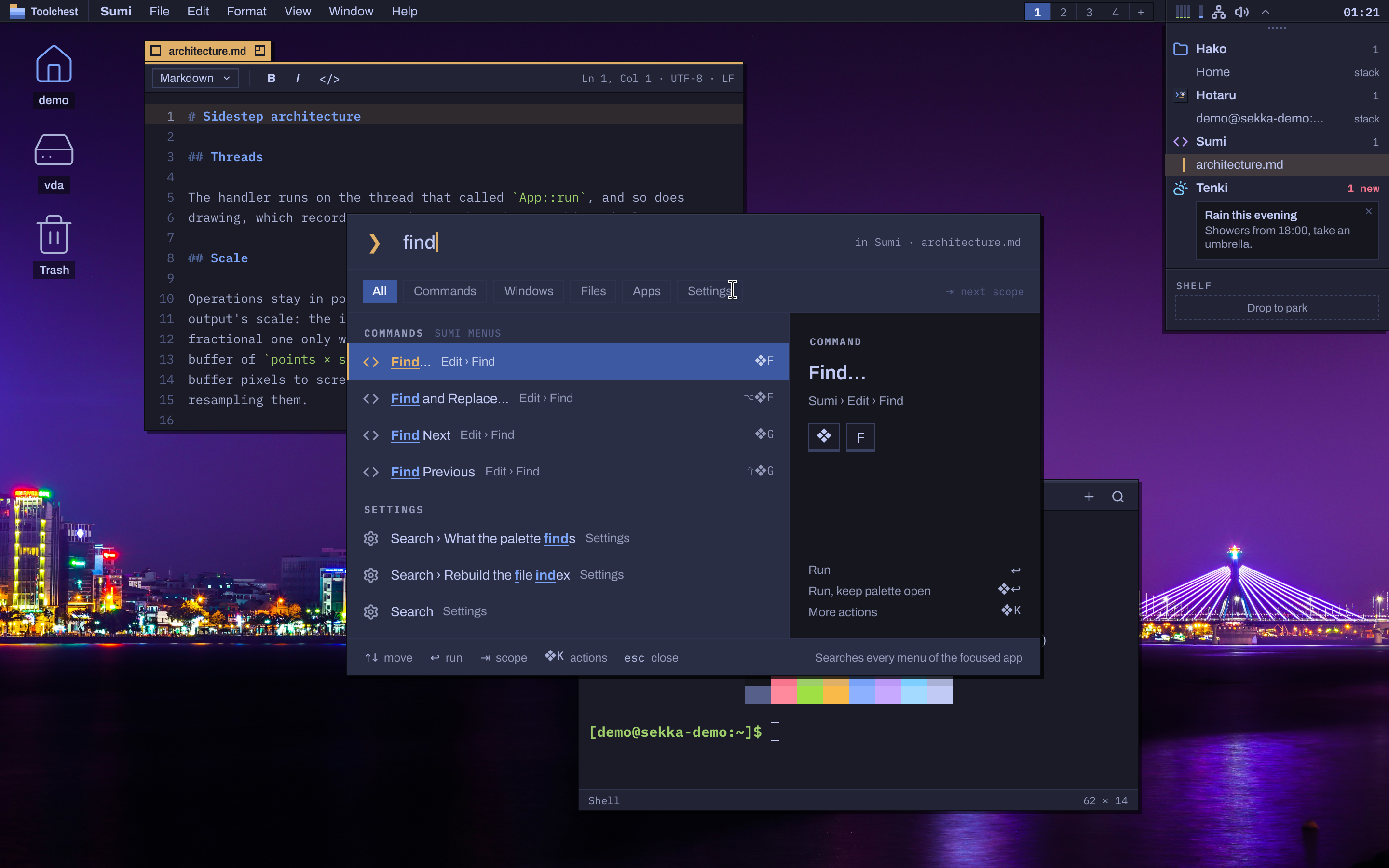
Super + Space opens the command palette on the screen you're using. It searches every command in the focused app's menus and shows each one's shortcut, so you learn it as you go, along with windows, files, apps, settings and arithmetic. Tab narrows it to one of them.

Start typing in the Toolchest and it becomes the palette.

Aizome's command palette over the desktop, with find typed and the matching commands, windows and files listed.
The command palette (Super + Space) with find typed, in the same test VM. 2880 × 1800, not upscaled

The keys you'll want first

Super + SpaceThe command palette
Super + right-clickThe focused app's whole menu, at the pointer
Super + Alt + SpaceThe Toolchest
Super + ReturnThe default terminal, Hotaru unless Settei names another, in the Desk's folder
Super + C / V / ZCopy, paste and undo, in every app
Super + TabSwitch apps, then that app's windows
Super + Alt + ↑ / ← / →Fill the screen, or split it left or right
Super + Ctrl + SpaceThe window's own menu, a key for every move
Super + Shift + [ / ]The previous or next tab in a group
Super + Ctrl + SStack this window with the one behind it
Super + Ctrl + 1…9Go to a Desk; with Shift, take the window along
Super + Ctrl + ↑Every Desk
Super + Ctrl + FFull screen
Super + H / M / QHide, minimise or quit the app
Super + Ctrl + QLock the screen

Its own apps

Aizome comes with its own apps, each named with a Japanese word for what it's for, and each built on Sukumo: the same menus, the same palette, Night and Day, and every command reachable from the keyboard.

Every app in detail, at aizome.computer

Settei, the settings

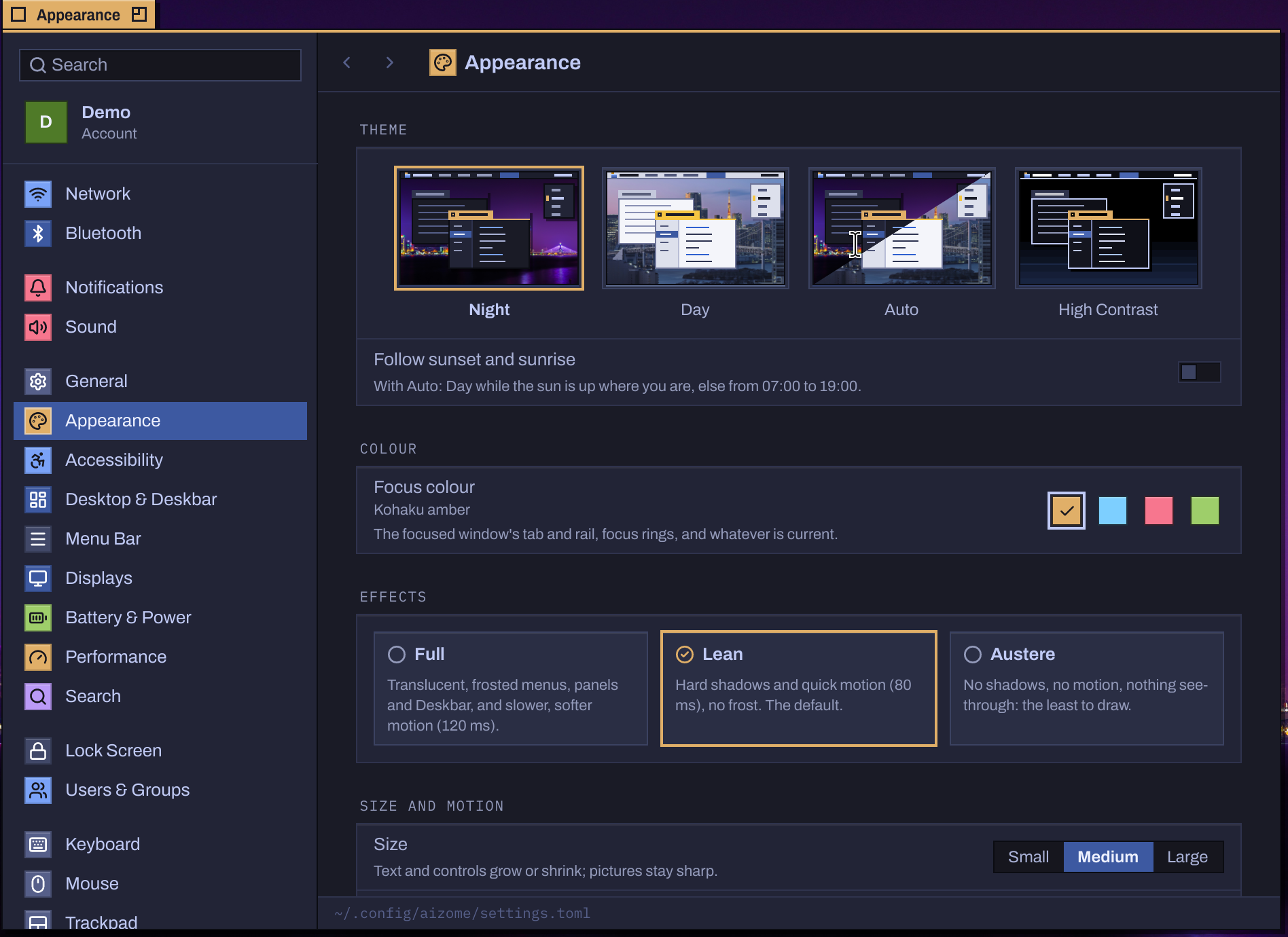
Settei is laid out as a Mac's System Settings: a search field, your account, then panes in groups, each pane a form beside them. Every option can be searched, here or from the palette.

Network, Bluetooth, sound, displays, appearance in Night, Day or High Contrast with a focus colour of your choosing, Desks and the Deskbar, the menu bar, power, the lock screen, accounts and keyboards are all here, and Settei sets up each new keyboard you plug in.

Settei, Aizome's Settings, at its Appearance pane, with the search field, the account card and the panes in groups down its sidebar.
Settei at Appearance, cropped to its window with its tab, frame and shadow, in the same test VM. 1896 × 1380, not upscaled

Hotaru 蛍, the terminal

Super + Return opens Hotaru, Aizome's own terminal, and programs that need a terminal open in it too. It is built with Aizome's toolkit, not GTK or a web view: native menus, tabs of independently focused split panes, and search through the scrollback. It opens in fish, set up as Omarchy sets it up: a Starship prompt, vi keys, and fzf searches of your history and files.

foot is installed too: choose it in Settei, under General › Default Apps › Terminal.

The login screen

Aizome has its own login screen, and it lists every desktop you installed: Tatami, Plasma and the others share your account. With GNOME installed, GDM takes its place, since GNOME locks its screen only under GDM.

Yukimi's Desktops page adds and removes desktops later, and chooses which one starts.

On any NixOS system

On Sekka, choose Aizome in the installer, where it is selected by default, or add it later in Yukimi's Desktops page. On any NixOS system with flakes, add Sekka's flake, import the module and enable it; then pick Aizome on the login screen.

{
  inputs.sekka.url = "github:bitemyapp/sekka/nightly";
  outputs = { nixpkgs, sekka, ... }: {
    nixosConfigurations.example = nixpkgs.lib.nixosSystem {
      modules = [
        sekka.nixosModules.aizome
        { programs.aizome.enable = true; }
      ];
    };
  };
}

Every app, in detail.

Aizome has a site of its own, aizome.computer, which takes each of its apps, the desktop and its keys further than this page can.

Visit aizome.computer →Download Sekka